
Parallax Images
Meet the Pixel Parallax Images module for Divi! Stack images and text as free-floating layers that drift at different speeds as the visitor moves the mouse — an elegant depth effect for hero sections, portfolios and product showcases.
With the Pixel Parallax Images module you can:
- Stack any number of image or text layers in one composition
- Give every layer its own parallax depth on the X and Y axis — including opposite directions
- Position each layer freely with horizontal/vertical offsets and a layer width
- Add buttons to text layers for call-to-action compositions
- Style every layer independently with full Divi design options
How the module works
The Pixel Parallax Images module is a parent/child module: the parent is the stage, and each child item is one layer. Layers react to mouse movement — how much and in which direction is set per layer with the parallax depth values, so foreground layers can drift more than background layers, or even move the opposite way.
How to add the Parallax Images module
- Open a page with the Divi Visual Builder
- Click the + (Add New Module) button
- Search for Pixel Parallax Images and click it to insert the module
- Add a child item for every layer of the composition
Parent Settings
The parent module’s Settings group has one option: Activate on Container — when enabled, the parallax reacts to mouse movement over the module’s whole container instead of only over the layers themselves.
Layer Content (child items)
Each child item’s Content group:
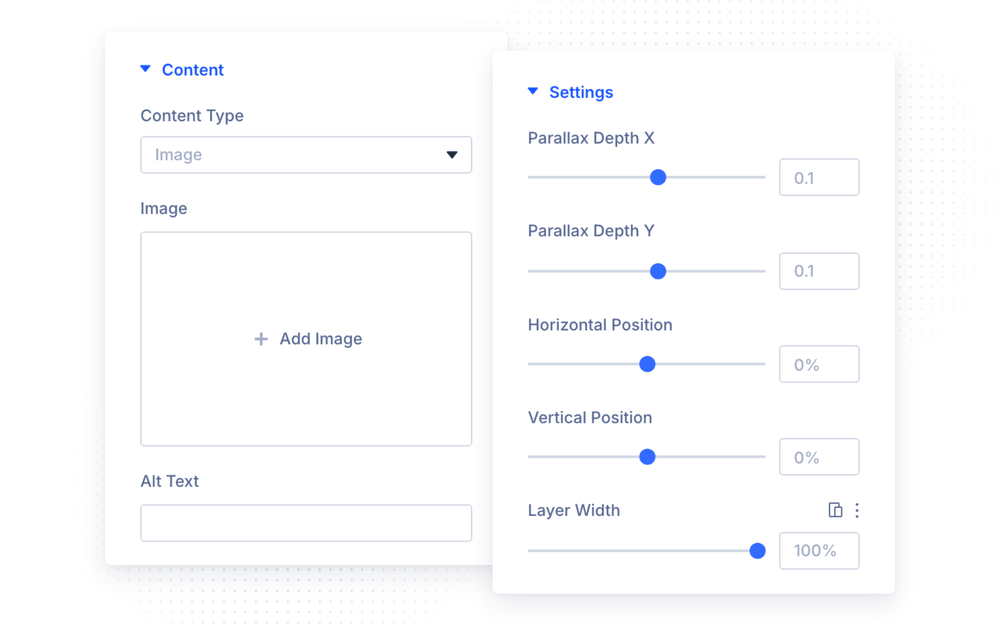
- Content Type — the layer is an Image or a Text layer
- Image — the layer image (image layers)
- Text — rich-text content (text layers), with an optional Use Button and button link
Layer Settings
The Settings group positions the layer and defines its motion:
- Parallax Depth X / Parallax Depth Y — how strongly the layer follows the mouse on each axis (−1 to 1); negative values move it in the opposite direction, 0 keeps the axis still
- Horizontal Position / Vertical Position — the layer’s resting offset within the stage (−100% to 100%)
- Layer Width — the layer’s maximum width (0–100%)
NOTE: Depth creates the illusion: give background layers small values (±0.05), midground layers moderate ones (±0.1–0.2) and the foreground the largest (±0.3+). Mixing positive and negative depths between layers makes the scene visibly “split” as the mouse moves.
Design Settings
Each layer supports Module Text and Button styling plus the full set of Divi design options — Sizing, Spacing, Border, Box Shadow, Filters and Transform — and the parent adds the same on the stage level, including Animation.
Design Ideas
- Hero composition — a large product image in the middle (depth 0.1), decorative shapes behind it (depth −0.05) and in front (depth 0.3).
- Portfolio teaser — three overlapping project shots at different depths with a floating text layer and a “View Work” button.
- Depth typography — a big text layer at negative depth behind a cut-out image layer at positive depth for a magazine-style effect.